Followers

Sunday, 15 May 2016

Ethical, social and legal issues

Assalamualaikum,

Pada minggu ini, pensyarah kami iaitu Dr. Johari telah menerangkan topik terakhir bagi kelas telekomunikasi dan rangkaian. Topik yang terakhir ini adalah amat penting dalam kehidupan kita kerana ia merangkumi etika, sosial dan isu undang-undang dalam rangkaian yang terdapat di dalam komputer kita. Saya telah membuat sedikit rumusan berkaitan topik yang diajar :

Intellectual Property Rights

  • Refers to creations of the mind, original creative works from the creator-software, applications, systems, websites, etc.
  • IP is protected in law by, for example, patents, copyright and trademarks, which enable people to learn recognition or financial benefit from what they invent or create.
  • By striking the right balance between the interests of innovators and the wider public interest, the IP system aims to foster an environment in which creativity and innovation can flourish.
Copyrights

  • Copyright is the exclusive right given to the owner of a copyright for a specific period.
  • Permission must be obtained to use a copyrighted material from the copyright holder (and pay any required fee)
  • Exception: concept of fair use which permits limited duplication and use of a portion of copyrighted material for special purposes, such as teaching, research, news reporting, commentary, criticism.
http://bookwormtranslations.com/copyright-law-and-translation-what-you-need-to-know/
Trademarks

  • A trademark is a sign which distinguishes the goods and services of one trader from those of another.
  • A mark includes words, logos, pictures, names, letters, numbers or a combination of these.
  • A trademark is used as a marketing tool to enable customers in recognizing the product of a particular trader.
https://www.zepo.in/blog/2013/08/31/guide-how-to-register-trademark-for-your-brand-in/
Patents

  • A patent is an exclusive right granted for an invention, which is a product or a process that provides a new way of doing something, or offers a new technical solution to a problem.
  • A patent or utility innovation protection gives the owner of the patent/utility innovation the exclusive right to stop others from manufacturing, using and/or selling the owner's invention without the owner's consent or permission.

Network and computer security

Assalamualaikum,

Pada minggu ini, saya dan rakan-rakan telah diajar tentang network and computer security. Apa yang saya tahu ialah network and computer security adalah untuk mencegah dan memantau akses yang tidak dibenarkan, penyalahgunaan, pengubahsuaian serta penafian dalam rangkaian komputer. Tujuan security dibuat juga adalah untuk mengelak sebarang pencurian data, maklumat peribadi dan sebagainya. Saya telah membuat sedikit rumusan berkaitan topik tersebut :

SSL or Secure Socket Layer Certificates
  • Small data files that digitally bind a cryptography key to an organization's details.
  • Allow secure connections from a web server to a browser.
  • When installed on a web server, it activates the padlock and the http protocol.
  • Typically, SSL is used to secure credit card transactions, data transfer and logins.
Client Security Issues

Phishing

  • Attacks are performed with the intention to acquire personal information.
  • One common approach of performing phishing attack - send e-mails to stem from an official representative of a well-known company.
  • The recipient are encouraged to enter personal identification data.
http://blog.hotspotshield.com/2013/10/15/prevent-phishing-attacks/
Web Spoofing

  • Mocking the web presences of trusted corporations with the intention to trick customers.
  • Also employed for phishing attacks.
  • Typically relies on the following factors such as convincing website and email design, use of convincing URLs and pretending "secure" connections.
http://www.texascollaborative.org/SmithModule01/sec3_con.php
Desktop Security Issues

Adware
  • Programs used to deliver advertising contents.
  • Visible to the user, experienced to be annoying.
Spyware
  • Intends to remain unrecognized.
  • Used to gather personal info like login details, etc.
  • Spyware monitors the user's activities and scan the system.
Viruses
  • Programs that are attached to executable files or documents.
  • Virus is executed when the host program is executed or documents is loaded.
  • Spread through sharing of infected files or sending emails with viruses contained in the attachment.
  • Some only replicating, while some can cause further damage to the systems.
Worms
  • Programs that can replicate or copy themselves
  • For example, when it is being distributed as email attachments, a worm might send a copy to all the addresses listed in the local email address book.
Trojan horses
  • Programs that do not replicate themselves but typically cause damage or compromise security of infected computers.
  • It appears to be useful software and often the pretended useful functionality.
  • But when executed, they perform other kind of functionality.
  • Damage caused varies - include data theft and destruction or illegitimate access.
http://www.bbc.co.uk/education/guides/zp8mxnb/revision/2

Saturday, 14 May 2016

Internet Application

Assalamualaikum,

Pembelajaran pada minggu ini lebih tertumpu kepada aplikasi internet dalam proses pengajaran dan pembelajaran. Apabila ia datang kepada pembelajaran dalam talian, pelajar menggunakan komunikasi segerak (synchronous) dan tidak segerak (asynchronous) untuk menyelesaikan kerja-kerja yang dilakukan. Saya telah merumuskan apa yang telah dipelajari di bawah:

Asynchronous communication is a communication that is not occurring at the same time. Discussion forums and email are two examples of how asynchronous communication is employed in online learning. There are pros and cons in asynchronous communication:

Pros:
  • Students have plenty of time to formulate thoughts.
  • Students are able to respond in detail to a question or topic that they might have answered incompletely in a real-time conversation.
  • Helps students internalize information by giving them time to research certain ideas or merely extra time for contemplation.
Cons:
  • Time lost waiting for a response
https://blog.codepath.com/2012/11/15/asynchronous-processing-in-web-applications-part-1-a-database-is-not-a-queue/
Synchronous communication is a communication that is occurring at the same time. Chat rooms and online conferences are good example of synchronous communication. In a chat room, people's comments to each other are relayed immediately, enabling a real-time discourse. Similarly, online conferencing with the benefit of voice over Internet protocol (VOIP) tools enable real-time conversations to take place online. Real-time conversations allow people to explore, through writing or talking, the class concepts. The act of verbalizing helps students build bridges between different ideas and concepts, thus helping them retain information more effectively.

Example :
http://blogs.skype.com/2014/10/09/improved-skype-desktop-clients-for-a-dynamic-new-chat-experience/
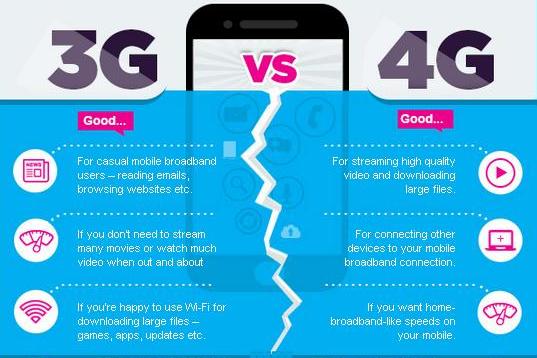
Difference between 3G & 4G 

http://www.slideshare.net/rAosAhAboO7/4g-technology-ppt-by-rahul-yadv

Monday, 2 May 2016

Internet Infrastructure

Assalamualaikum,

Pada permulaan minggu ini, saya dan rakan-rakan dikehendaki untuk menjawab mid test bagi topik yang telah dipelajari sepanjang 8 minggu di dalam kelas telekomunikasi dan rangkaian. Selepas itu, pensyarah memulakan sesi p&p dengan menerangkan topik yang bertajuk infrastruktur internet. Saya telah membuat sedikit rumusan berkaitan topik yang diajar :

What is internet?
  • A global collection of network.
  • Interconnected computers work by transmitting data through a special type of packet switching which is known as the IP (internet protocol).
  • When you connect to the Internet. your computer becomes part of a network.
A hierarchy of network :
  • From a single computer to LAN
  • From LAN to ISP
  • ISP to WWW
Internet Service Provider :
  • ISP Also called IAP (Internet Access Provider).
  • Company that provides access to the internet.
  • Usually ISP provide software package, username, password and access phone number and modem.
  • ISP are connected to one another through Network Access Points (NAPs)
  • Example of ISP : TM
http://www.slideshare.net/dulithsl/internet-protocol-ip-ppt
http://webpage.pace.edu/ms16182p/networking/protocols.html
An IP address consist of 32 bits, often shown as 4 octets of numbers from 0-255

Domain Main System:
http://www.seopearl.com/internet-web-technologies/module4/domainName-service-structure.php

HTTP (HYPER TEXT TRANSFER CONTROL) :


• HTTP defines how messages are formatted and transmitted and what actions
Web servers and browsers should take in response to various command.
• For example, when you enter a URL in browser, this actually send an HTTP
command to the web server directing it to fetch and transmit the requested
page.

Type of internet connection and access:

-dial connection
-cable
-satellite internet access
-fixed wireless
-broadband
-mobile access