Followers

Monday, 2 May 2016

Internet Infrastructure

Assalamualaikum,

Pada permulaan minggu ini, saya dan rakan-rakan dikehendaki untuk menjawab mid test bagi topik yang telah dipelajari sepanjang 8 minggu di dalam kelas telekomunikasi dan rangkaian. Selepas itu, pensyarah memulakan sesi p&p dengan menerangkan topik yang bertajuk infrastruktur internet. Saya telah membuat sedikit rumusan berkaitan topik yang diajar :

What is internet?
  • A global collection of network.
  • Interconnected computers work by transmitting data through a special type of packet switching which is known as the IP (internet protocol).
  • When you connect to the Internet. your computer becomes part of a network.
A hierarchy of network :
  • From a single computer to LAN
  • From LAN to ISP
  • ISP to WWW
Internet Service Provider :
  • ISP Also called IAP (Internet Access Provider).
  • Company that provides access to the internet.
  • Usually ISP provide software package, username, password and access phone number and modem.
  • ISP are connected to one another through Network Access Points (NAPs)
  • Example of ISP : TM
http://www.slideshare.net/dulithsl/internet-protocol-ip-ppt
http://webpage.pace.edu/ms16182p/networking/protocols.html
An IP address consist of 32 bits, often shown as 4 octets of numbers from 0-255

Domain Main System:
http://www.seopearl.com/internet-web-technologies/module4/domainName-service-structure.php

HTTP (HYPER TEXT TRANSFER CONTROL) :


• HTTP defines how messages are formatted and transmitted and what actions
Web servers and browsers should take in response to various command.
• For example, when you enter a URL in browser, this actually send an HTTP
command to the web server directing it to fetch and transmit the requested
page.

Type of internet connection and access:

-dial connection
-cable
-satellite internet access
-fixed wireless
-broadband
-mobile access

Saturday, 30 April 2016

After Mid Semester Break

Assalamualaikum,

Selepas cuti pertengahan semester, pensyarah kelas telekomunikasi dan rangkaian telah diganti dengan pensyarah kedua iaitu Dr. Johari. Beliau akan meneruskan sesi pengajaran dan pembelajaran bagi subjek ini. Pada minggu ini, beliau telah mengajar topik baru iaitu Email. Saya telah membuat rumusan bagi topik yang telah diajar :

What is Email ?


• A mail, but is sent electronically across the Internet.
• Quickly delivered in seconds or minutes.

Advantages:
–Convenience, Fast speed, Inexpensive, Printable, Reliable, Global, Generality
(not limited to text, but graphics, programs, even sounds)
Disadvantages:
–Misdirection, Interception, Forgery, overload, Funk (Spamming), No response
(from the receiver).

Email Client and Server:
• Email client – software / program that can transfer e-mail from a local host
to a local e-mail server.
• Email server – software/program that can send/receive e-mail from/to other
email servers.
• Mailbox – An electronic mailbox is a disk file which holds email messages.

Carbon Copy Section (cc)
  • Send a message to more than one person, all the recipients will see the list of email address.
Blind Carbon Copy Section (bcc)
  • The addresses won't be seen by the recipients.
  • When email is sent to a large group of people who don't know each other.
Spam Mail

https://www.goodthingsguy.com/the-good-stuff-from-abroad/this-is-what-happens-when-you-reply-to-spam-mail/
  • Email spam, also known as junk email sending messages to numerous recipients by email.
  • The messages may contain disguised links that appear to be for familiar websites but in fact lead to phishing web sites or sites that are hosting malware.
  • Spam email may also include malware as scripts or other executable file attachments.

Thursday, 21 April 2016

Basic Web Development & Sanako Lab

Assalamualaikum,


Pembelajaran pada minggu ini meliputi tajuk 'Basic Web Development' dan lawatan sambil belajar ke makmal digital. Saya telah membuat sedikit rumusan berkaitan dengan tajuk yang diajar pada minggu ini serta laporan berkaitan lawatan ke makmal digital tersebut :

Basic Web Development:

What is HTML?
  • An acronym for HyperText Markup Language, HTML is the language used to tag various parts of a Web document so browsing software will know how to display that document's links, text, graphics and attached media. 
What is an HTML file?
  • HTML stands for Hyper Text Markup Language  
  • An HTML file is a text file containing small markup tags   
  • The markup tags tell the Web browser how to display the page   
  • An HTML file must have an htm or html file extension  
  • An HTML file can be created using a simple text editor
HTML: Head, Title, Body 
<html>
<head>
<title>Title of page</title>
</head>
<body>This is my homepage.
<b>This text is bold</b>
</body>
</html>


Hasil carian imej untuk different between file with .asp and .php

HTML Editor:

You can easily edit HTML files using a WYSIWYG (what you see is what you get) editor like FrontPage, Publisher, Adobe Dreamweaver, Adobe Flash, Claris Home Page, or Adobe Page Mill instead of writing your markup tags in a plain text file.

To learn more about using HTML, you can go to this site:

Laporan lawatan ke makmal digital:

Saya dan rakan-rakan diarah untuk ke akademik bahasa di D-05 pada minggu lepas. Banyak info baru berkaitan komputer dan perisian komputer yang kami dapat semasa lawatan. Antaranya:
  • semua makmal digital di bangunan akademik bahasa telah menggunakan perisian komputer sanako iaitu sanako 300 dan sanako 12 hundred.
  • makmal tersebut mempunyai 37 buah komputer termasuk komputer pensyarah.
  • makmal tersebut jugak telah menggunakan CAT5 iaitu cable Lan dan jugak cable internet.
Terdapat beberapa gambar yang diambil semasa lawatan ke makmal digital tersebut:

susunan komputer di dalam salah sebuah makmal.
pensyarah di dalam makmal tersebut tengah membuat
penerangan berkaitan kegunaan sanako lab
gambar saya dan rakan sekumpulan bersama En. Syed
Pada minggu ini, saya dan rakan-rakan dikehendaki membentangkan laporan berkaitan makmal digital di dalam bentuk power point.


Pada minggu ini juga merupakan hari terakhir kelas bersama Dr. Norashikin. Saya disini mengambil kesempatan untuk mengucapkan ribuan terima kasih kepada dr. kerana telah memberi ilmu dr. kepada kami tanpa jemu sepanjang 7 minggu kelas bersama dengan dr.

Gambar saya dan rakan- rakan sekelas bersama dengan Dr. Norashikin

Thursday, 24 March 2016

Wireless Technology & Web Searching

Assalamualaikum,

Pembelajaran pada minggu ini meliputi dua topik iaitu Wireless Technology & Web searching. Saya telah membuat beberapa rumusan berkaitan kedua-dua topik tersebut :

Wireless Technology :
  • Used to send data through the airwaves between devices, instead of physical cable.
  • Wireless technology is generally used for mobile IT equipment. It encompasses cellular telephones, personal digital assistants (PDA's), and wireless networking.
  • Other examples of wireless technology: GPS units, garage door openers and or garage doors, wireless computer mice and keyboards, satellite television and cordless telephones.
Types of wireless network :

Wireless wide area networks (WWANs)
Wireless metropolitan area networks (WMANs)
Wireless local area networks (WLANs)
Wireless personal area networks (WPANs)


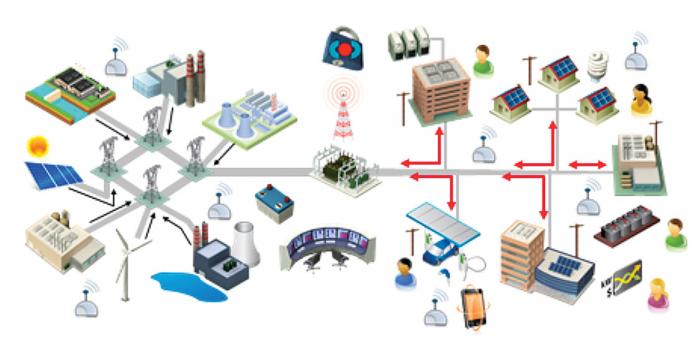
http://www.fortnightly.com/sites/default/files/styles/story_large/public/1407-TC.jpg?itok=ni-NN7Ra

Types of wireless technology :

Infra Red
Wireless local area networks (WLANs) , WiFi
Broadband wireless.
Bluetooth,
WiMax

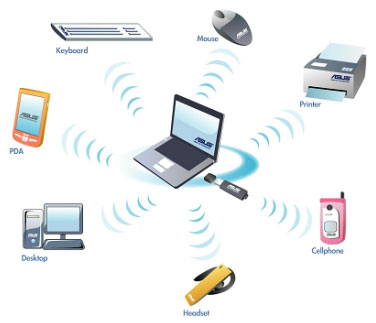
http://www.exuberantsolutions.com/images/wireless.jpg
Web Searching :
  • World Wide Web (or WWW, It is called a “web” because the interconnections between documents resemble a spider’s web).
  • A software application that makes it easy and possible for nearly anyone to publish and browse hypertext documents on the Internet.
Types of web searching :

-Directories
-Search engines
-Meta-search engines
-Yellow pages

Web Browser :

• Can be defined as a software application used to locate and display web.
• Popular browser
–IE (Internet Explorer)
–Netscape
–Mozilla Firefox
–Safari
–Opera
–Mosaic and ask

How does searching work :

• User Interface–Allows you to type a query and displays the results.
• Searcher –The engine searches the database for matching your query.
• Evaluate–The engine assigns scores to the retrieved information.
• Gatherer–The component that travels the WEB, and collects information.
• Indexer –The engine that categorizes the data collected by the gatherer.

http://www.dominateurmarket.com/wp-content/uploads/2014/08/searchengines.jpg

Sunday, 20 March 2016

Laporan Pertandingan Inovasi

Assalamualaikum,


Pada minggu ini, saya dan rakan-rakan telah diarah untuk ke pertandingan inovasi dan diminta untuk membuat sebuah laporan berkaitan dengan mana-mana satu booth yang kami minat.


Saya telah memilih booth 115 iaitu booth Mesin Pengering & Pewangi Kaki Miss Q sebagai tajuk laporan saya. Mesin Pengering dan Pewangi kaki ini adalah satu mesin yang mempunyai dua fungsi dan merupakan mesin mudah alih. Selain itu, mesin tersebut dicipta untuk membasmi masalah bau stoking atau kaki. Saya telah membuat sedikit rumusan dan menangkap beberapa keping gambar berkaitan dengan booth serta mesin tersebut: 

Pembelajaran abad ke-21 menuntut para pelajar untuk kerap berada di dalam kelas-kelas khas seperti bilik komputer, perpustakaan dan sebagainya. Proses pengajaran dan pembelajaran di bilik komputer atau perpustakaan yang berpenghawa dingin memerlukan murid-murid untuk membuka kasut masing-masing. Dengan keadaan stoking yang lembap akibat peluh daripada aktiviti Pendidikan Jasmani, bau yang kurang enak terhasil apabila semua murid yang berstoking memasuki bilik atau perpustakaan tersebut. Keadaan bau yang busuk dari stoking murid-murid telah menyebabkan mereka berasa tidak selesa untuk belajar di tempat tersebut. Lantas pasukan inovasi SK Canossian Convent telah mencipta mesin pengering dan pewangi kaki untuk digunakan sebelum memasuki kelas-kelas khas tersebut. Natijahnya, masalah bau yang tidak enak ini dapat diatasi dengan terciptanya Mesin Pengering dan Pewangi Kaki Miss Q.

Gambar bersama Mesin Pengering dan
Pewangi Kaki Miss Q

Gambar bersama dengan pelajar-pelajar
SK Canossian Convent


Friday, 11 March 2016

Connecting a Network (Part 1) : Cabling and Hardware

Assalamualaikum,

Pada permulaan kelas minggu ini, saya dan rakan-rakan dikehendaki untuk membentangkan tugasan yang telah diberikan kepada kami pada minggu lepas yang bertajuk network electronic device.

Network electronic device :
  • bridges
  • routers
  • multiplexers
  • switches
  • hubs
  • gateways
  • front end processors
Kumpulan saya telah memilih tajuk routers untuk dibentangkan. Melalui pembentangan kami itu, saya telah membuat rumusan mengenai tajuk tersebut.

Definition: A piece of electronic equipment that connect network to each other and sends information between network.

Type of routers:
  • broadband routers
  • wireless routers
Function routers:
  • spread network
  • join neighboring or distant network
  • broadcasting wifi signal
Advantages and disadvantages of routers:
http://www.slideshare.net/rupinderj/networking-devices-12807479

Seterusnya, pensyarah kami meneruskan kuliah dengan menerangkan tajuk berkaitan perhubungan rangkaian (cabling and hardware). Kemudian, beliau memberikan tugasan kumpulan untuk membina model rangkaian mudah dengan menggunakan beberapa komponen rangkaian seperti:
  • printer (1)
  • computer (2)
  • personal laptop (1)
  • server (1)
  • concentrator/hubs (1)
  • network interface card (2)
  • wires

Sunday, 6 March 2016

Computer Networking

Assalamualaikum, 

Pembelajaran pada minggu ini berkaitan dengan computer networking. Saya telah belajar serba sedikit tentang definisi,jenis rangkaian serta komponen rangkaian. Bagi memudahkan saya untuk memahami pembelajaran pada minggu ini, saya telah menghasilkan mind map bagi tajuk ini.

Mind map about computer networking
Definition : computer networking is a collection of computers and other hardware devices so that network users can share hardware, software, data and they can communicate with each other electronically.

Type of network: Pan, Lan, Man, Wan.

Type of physical topology:


Type of logical topology:
  1. shared media topology
  2. token based topology